Inventory and reorder tracker
Setup, expected results and troubleshooting
Use this workbook for a small stock review at one location. It calculates opening stock plus valid signed movements per SKU, then separates replenishment candidates from negative balances and input errors. It does not value inventory or approve purchases.
Download the files
- Blank Excel template
- Filled Excel example
- Complete pack: both files, instructions and test notes
- Dated test notes
Check the worked example
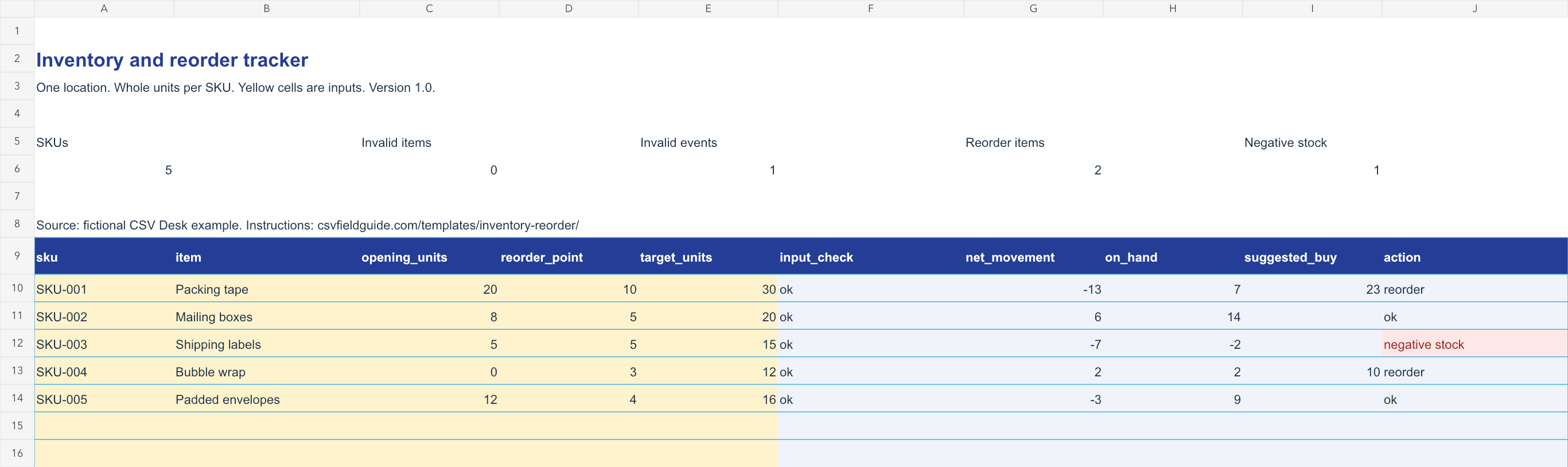
This is a rendered workbook preview, not an English-interface Excel screenshot. The native application test used a Chinese-language Excel interface with English worksheet content.
| SKU | On hand | Action | Suggested buy |
|---|---|---|---|
| SKU-001 | 7 | reorder | 23 |
| SKU-002 | 14 | ok | blank |
| SKU-003 | -2 | negative stock | blank |
| SKU-004 | 2 | reorder | 10 |
| SKU-005 | 9 | ok | blank |
The summary shows 5 SKUs, 0 invalid items, 1 invalid event, 2 reorder items and 1 negative stock balance. The unknown SKU-999 event is deliberately excluded. Fix it or explain it before relying on the stock figures. The negative label stock is an investigation item, not an automatic order recommendation.
Enter the stock list and movement batch
- On Stock, use A10:E59 for up to 50 unique SKUs: text SKU, item name, opening units, reorder point and target units.
- Enter non-negative whole numbers. Target units must be at least the reorder point. Do not mix units within a SKU.
- On Movements, use A6:D155 for up to 150 events: unique event ID, existing SKU,
InorOut, and a positive whole-number quantity. - Use opening stock immediately before your chosen batch. This workbook has no date filter: every populated movement row belongs to that batch. Do not include movements already counted in opening stock.
- Review invalid items and events first. Then investigate negative stock. Only after that, filter or review the
actioncolumn forreorderand inspect each proposed quantity.
net_movement adds valid In quantities and subtracts valid Out quantities. on_hand adds that net movement to opening units. Reorder triggers at or below the reorder point; suggested buy is target minus on-hand. Invalid matching events produce a review warning: any displayed balance is provisional. An unknown SKU has no master row to warn, so the global invalid-event count matters.
Common failures and decisions
| Symptom | What to check |
|---|---|
| Invalid event | Unknown SKU, repeated event ID, direction spelling or non-positive/fractional units |
| Invalid item | Duplicate SKU, missing opening value, negative values or target below reorder point |
| Negative stock | Missing inbound event, duplicate outbound entry, wrong opening quantity or wrong batch boundary |
| Unexpected replenishment | Confirm the unit and target; do not add unrelated SKUs into one units total |
| Same SKU appears many times | Expected in Movements; not allowed in the Stock master |
Both copies of a duplicated event ID are excluded. Multiple different event IDs for the same SKU are legitimate. Use the duplicate-review guide before deleting any rows, and reconcile by group to trace quantities per SKU.
Native Excel test record
On November 26, 2026, the example was opened and saved in local Excel. All five on-hand balances and summary controls matched the table above. Changing Stock C10 from 20 to 30 changed SKU-001 on-hand from 7 to 17 and reduced reorder items from 2 to 1. Restoring 20 restored the baseline. Changing the unknown movement SKU to SKU-005 reduced invalid events to 0 and changed SKU-005 on-hand from 9 to 13; restoring SKU-999 restored the original exception. These saved workbook results were independently read and compared with the expected values.
The separate automated suite covers duplicate keys, invalid quantities, boundary capacity and the reorder equality condition. The download includes dated notes that distinguish native checks from automated tests.
Limits
One location, whole units, 50 master SKUs and 150 events. No inventory valuation, purchase-order generation, fractional weights, lot tracking, transaction dates or multi-warehouse transfers. The example intentionally includes an unresolved event and negative balance: it is a learning case, not a clean operational report.
Before entering your own data
Download the blank file and save a separate working copy. Yellow cells are inputs; pale formula columns calculate checks and results. Paste values into input columns only, not entire rows. Keep the sheet names and formula columns unchanged. These are fixed-capacity templates: adding rows outside the documented area does not extend the checks.
When replacing a batch, clear filters and remove all old input values first. A shorter new batch must not leave old records below it. Do not delete the formula columns. The blank file contains no sample records. The expense month and task review date are editable controls: set them for each review.
Text keys preserve leading zeros. Letter matching is case-insensitive: AB12 and ab12 are treated as the same key. Leading or trailing spaces are not silently repaired. Normalize identifiers deliberately using the leading-zero guide and space-cleaning guide. If letter case distinguishes real records in your system, this version is unsuitable.
Compatibility and use
Version 1.0. Native calculation was tested in desktop Excel for Mac on November 26, 2026. Windows Excel and browser spreadsheet apps have not been tested for this release. The workbooks use ordinary formulas, with no macros, external workbook connections or upload service. Your records remain in your local copy. Free to copy and adapt for your own work; retain a source copy and check results before operational use.
Keep the working file as .xlsx. CSV cannot preserve the workbook's multiple sheets, formulas, validation or presentation. Use the export checks if another system needs a separate flat delivery file.