Monthly expense and reimbursement tracker
Setup, expected results and troubleshooting
Use this workbook to review one month of expenses in one currency. It separates pending, paid and non-claimable records, flags missing receipts and excludes invalid rows visibly. It is a tracking worksheet, not an accounting ledger or payment approval system.
Download the files
- Blank Excel template
- Filled Excel example
- Complete pack: both files, instructions and test notes
- Dated test notes
Check the worked example
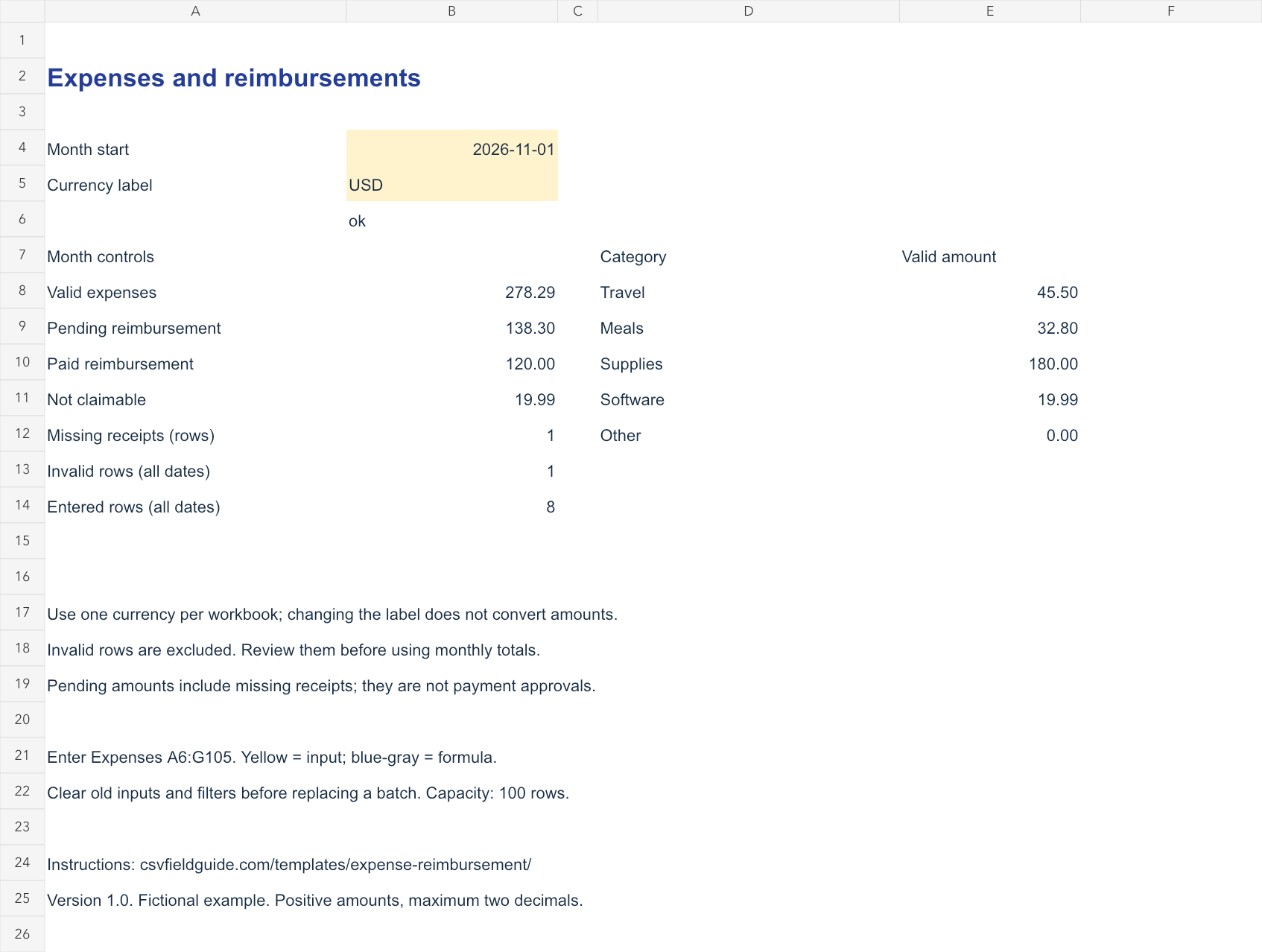
This is a rendered workbook preview. Native calculation was checked in a Chinese-language Excel interface with English worksheet content.
| November 2026 control | Expected |
|---|---|
| Valid expense amount | 278.29 |
| Pending | 138.30 |
| Paid | 120.00 |
| Not claimable | 19.99 |
| Missing receipts in the selected month | 1 |
| Invalid rows across the whole input area | 1 |
| Entered records across all dates | 8 |
Travel is 45.50, Meals 32.80, Supplies 180.00, Software 19.99 and Other 0.00. Category totals include all three claim statuses. The October 31 and December 1 records are outside November. EXP-08 has a missing amount and is excluded, with the error still visible.
Set the month and enter expenses
- Set Summary B4 to the first day of the review month, as a real Excel date. Set B5 to your single currency label. This label does not convert currencies.
- On Expenses, enter up to 100 records in A6:G105: unique expense ID, date, payee, category, amount, receipt and claim status.
- Use one of
Travel,Meals,Supplies,Software,Other;YesorNofor receipt; andPending,Paid,Not claimablefor status. - Amounts must be positive numbers with no more than two decimal places. Dates must be actual Excel dates, not merely text that looks like a date.
- Resolve the invalid-row count, review missing receipts, then compare the status and category totals with your source list.
The month window includes the first day and ends before the first day of the next month. Invalid rows from other months are still counted as invalid, so they cannot disappear silently. Missing-receipt count applies to valid records in the selected month, including non-claimable expenses.
Pending is not a payable total. It includes records missing receipts. A receipt marked Yes is not evidence of manager approval, tax compliance or reimbursement eligibility. Apply your own review policy before paying anything.
Common failures and decisions
| Symptom | What to check |
|---|---|
| Invalid month | B4 must be a real date on the first day of a month |
| Amount excluded | Blank, text, zero, negative or more than two decimal places |
| Duplicate ID | Both conflicting rows are invalid; determine whether one entry repeats a source record |
| Date looks correct but is invalid | Convert deliberately, then verify its numeric value using the date guide |
| Mixed currencies | Split into separate workbooks or normalize outside this template with a documented conversion |
| Refund or credit | This version excludes negative amounts; keep a separate reviewed adjustment record |
Use text amounts to numbers to resolve imported currency strings, and mixed date text to resolve date ambiguity. Do not remove separators or round amounts without checking the source convention.
Native Excel test record
On November 26, 2026, local Excel recalculated and saved the example. The seven summary controls matched the expected results above. Changing EXP-01 from Pending to Paid changed pending from 138.30 to 92.80 and paid from 120.00 to 165.50. Restoring its status restored the baseline. Entering 10.00 for EXP-08 changed total expenses to 288.29 and invalid rows to 0; clearing it restored the intentional error. Saved results were independently checked.
Automated tests additionally cover duplicate IDs, zero and negative amounts, excess decimal places, text dates, month boundaries and the final supported row. The downloadable test notes distinguish these from native Excel checks.
Limits
100 expenses, one currency, fixed categories and three statuses. No tax calculation, exchange rates, employee-level approval workflow, negative refunds, receipt storage or automatic payments. Use a controlled accounting system where those features are required.
Before entering your own data
Download the blank file and save a separate working copy. Yellow cells are inputs; pale formula columns calculate checks and results. Paste values into input columns only, not entire rows. Keep the sheet names and formula columns unchanged. These are fixed-capacity templates: adding rows outside the documented area does not extend the checks.
When replacing a batch, clear filters and remove all old input values first. A shorter new batch must not leave old records below it. Do not delete the formula columns. The blank file contains no sample records. The expense month and task review date are editable controls: set them for each review.
Text keys preserve leading zeros. Letter matching is case-insensitive: AB12 and ab12 are treated as the same key. Leading or trailing spaces are not silently repaired. Normalize identifiers deliberately using the leading-zero guide and space-cleaning guide. If letter case distinguishes real records in your system, this version is unsuitable.
Compatibility and use
Version 1.0. Native calculation was tested in desktop Excel for Mac on November 26, 2026. Windows Excel and browser spreadsheet apps have not been tested for this release. The workbooks use ordinary formulas, with no macros, external workbook connections or upload service. Your records remain in your local copy. Free to copy and adapt for your own work; retain a source copy and check results before operational use.
Keep the working file as .xlsx. CSV cannot preserve the workbook's multiple sheets, formulas, validation or presentation. Use the export checks if another system needs a separate flat delivery file.